Loading

Test automation built for mobile games. Record, replay, and scale your QA across Android and iOS.
Anthelion is a test automation platform purpose-built for mobile game studios. Unlike generic testing tools that rely on pixel matching or accessibility trees, Anthelion embeds directly into your game engine, giving you deep, reliable access to every object in your scene.
The platform integrates via a Unity SDK that auto-initializes with zero configuration. Write tests using a Selenium-style Python API with 7 locator strategies, or record gameplay interactions and replay them as automated test cases.
Real-time device management lets you discover, connect, and run tests across Android and iOS devices simultaneously. Whether you are running functional tests, regression suites, or sanity checks, Anthelion handles it end to end.
From recording gameplay to running tests on real devices, Anthelion covers the full test automation lifecycle.
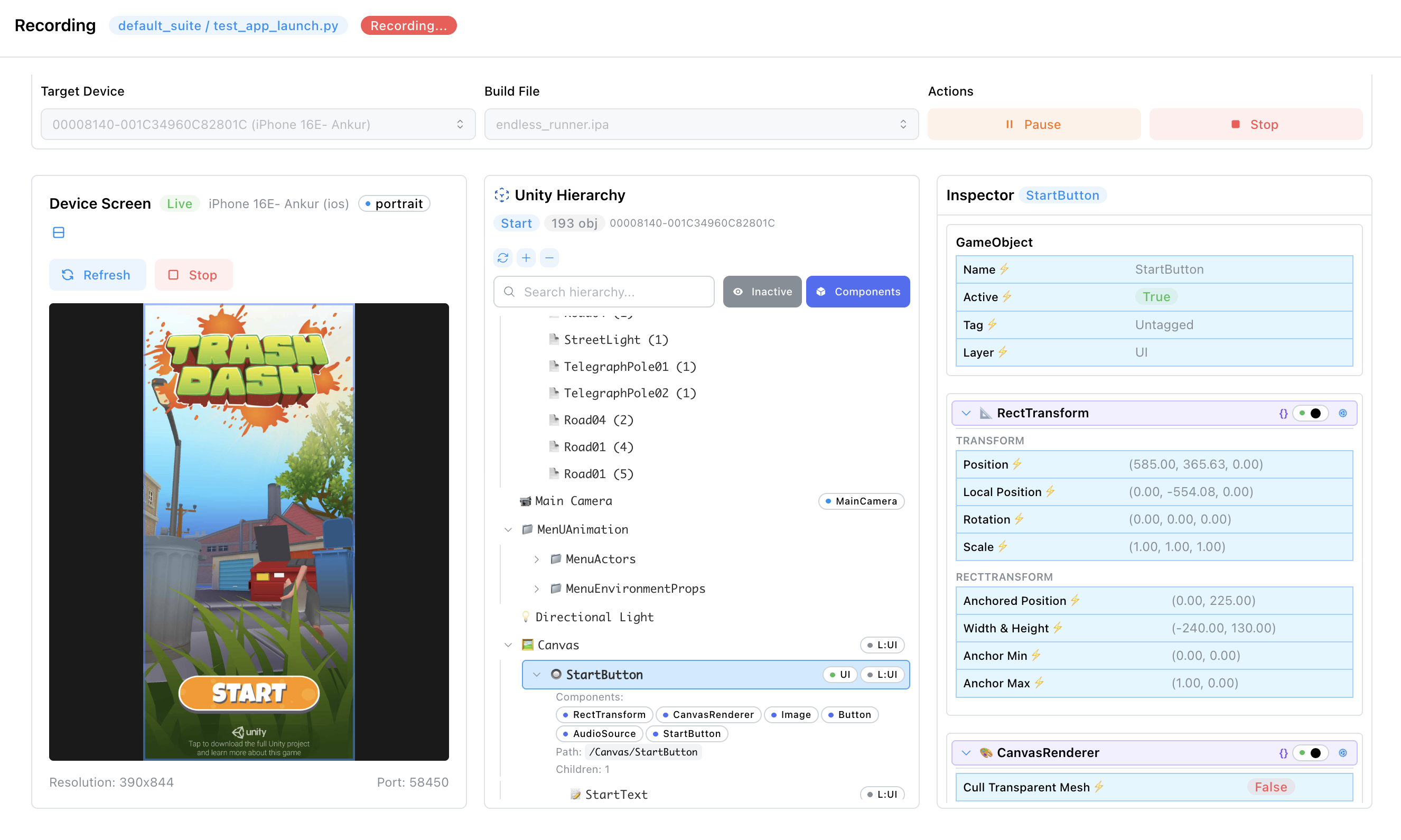
Capture gameplay interactions and replay as automated tests. No scripting required for basic test creation.
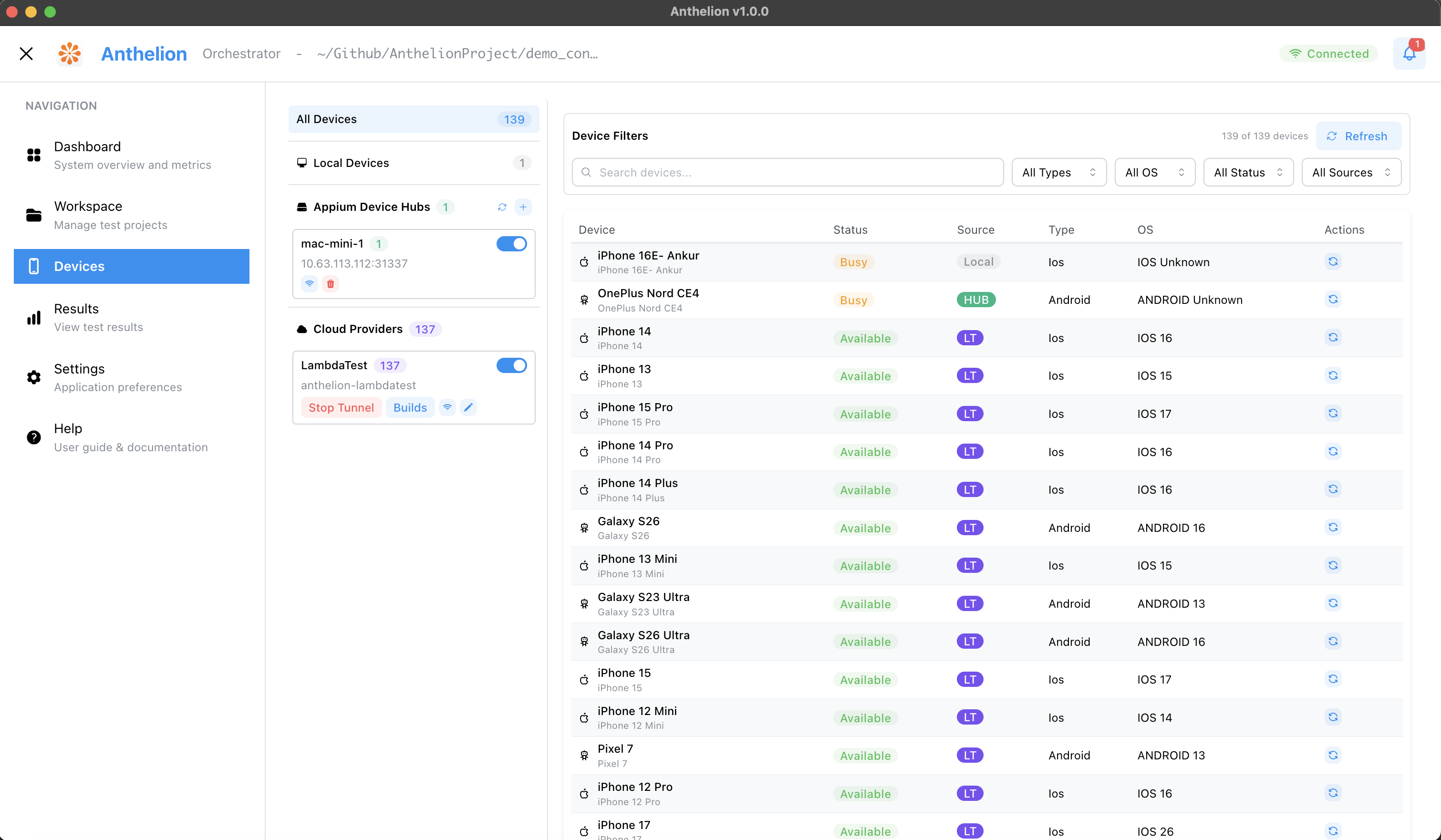
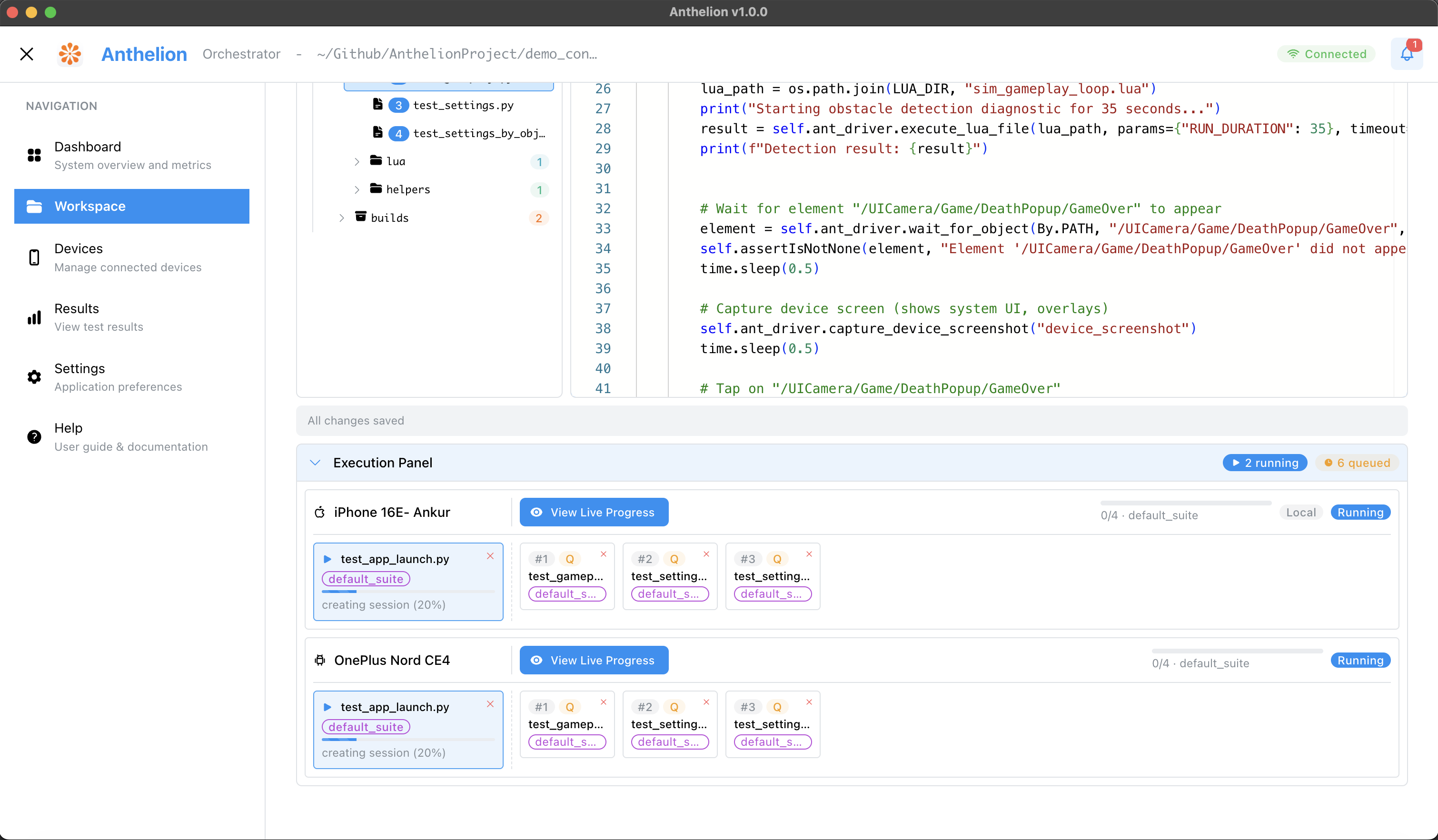
Test on Android and iOS real devices — locally via USB, across offices via LAN/WAN device hubs, or at scale on Cloud device hubs. Live stream tests and record videos on Local USB devices, remote device hubs, and LambdaTest cloud — all in one unified device list with parallel execution queues. Anthelion handles the hard parts: ADB reverse for Android on restricted networks, Multipeer Connectivity for iOS on corporate WiFi, automatic app install/launch/cleanup, and pre-staged binary uploads to remote hubs.
One package, zero setup.
Embeds into your Unity project via Package Manager with zero configuration — no scene edits, no initialization code, no runtime overhead. 29+ built-in commands with full scene reflection, on-device Lua scripting, and 7 locator strategies give you deep game-aware automation that pixel-matching tools can't touch.
Real-time device discovery, session management, and parallel test execution.
A professional Python SDK with 7 locator strategies, resolution-independent gestures, and native dialog handling — not a thin Appium wrapper. When network round-trips become the bottleneck, on-device Lua scripting runs your automation logic inside Unity at game frame rate: validate physics, check inventory state across frames, or sequence complex inputs — all in one call, all at game speed.
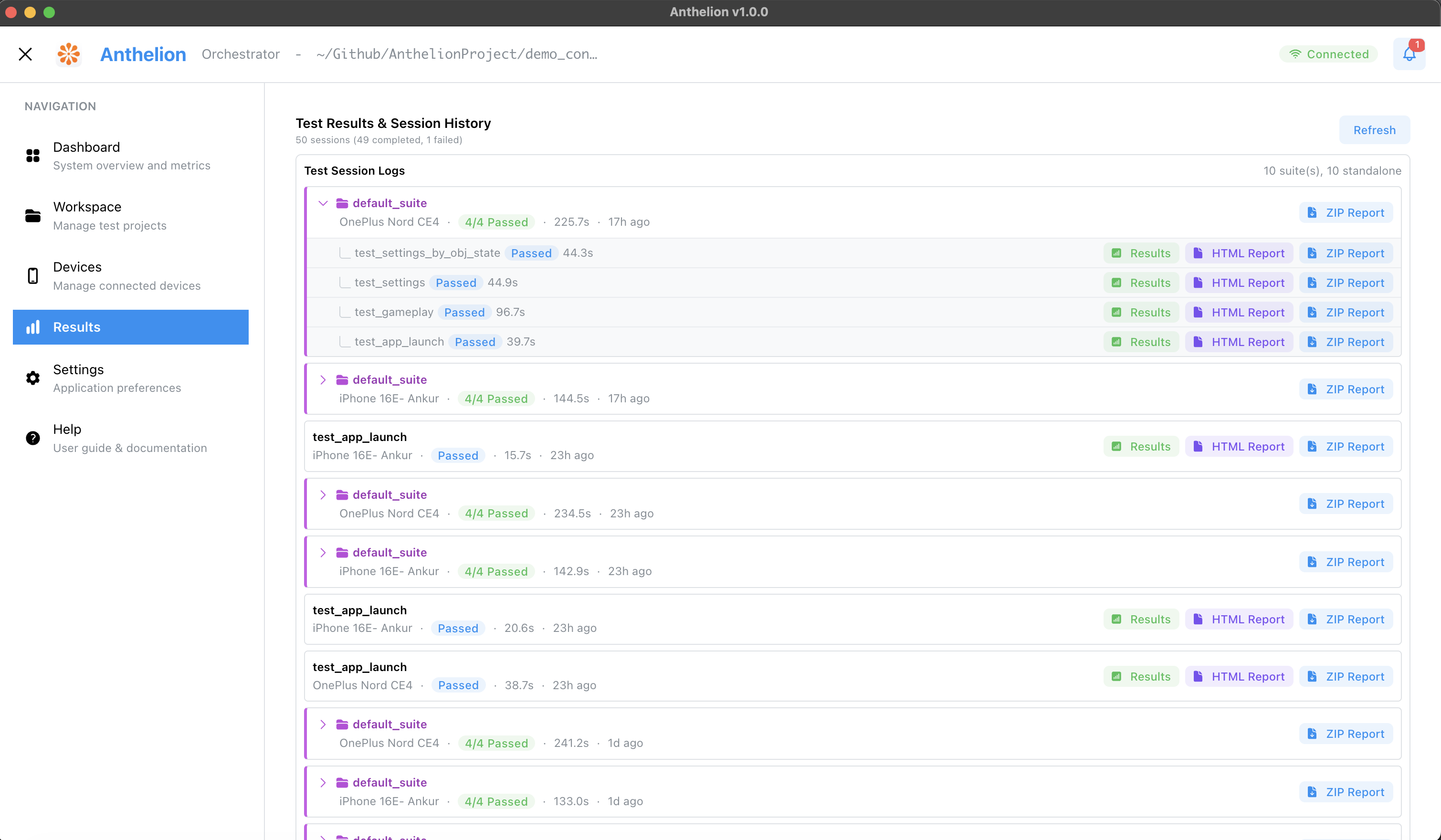
Detailed test execution results with screenshots, logs, and pass/fail metrics.
Familiar Appium-style automation architecture, purpose-built for games.
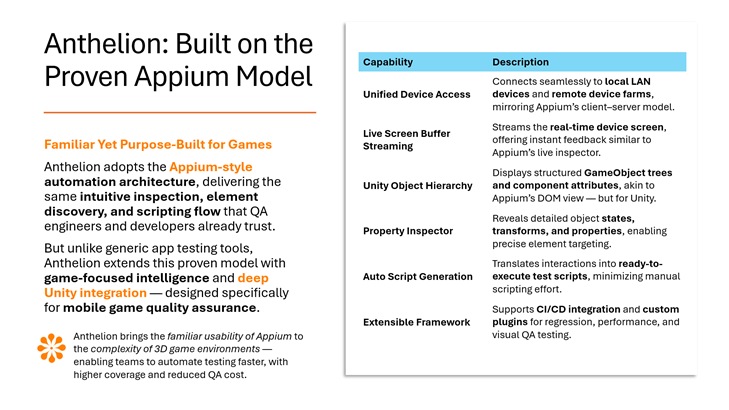
Real-time device screen buffer streaming gives instant visual feedback during test runs, similar to Appium's live inspector. Watch your game execute every step frame-by-frame across LAN devices or remote farms — debug failing cases the moment they break, without waiting for a full report.
Full runtime access to Unity's scene graph — not a screenshot, not a pixel grid, the actual live hierarchy with every GameObject, component, and property. Select a health bar and assert its fill amount. Find a button by its path and verify it's interactable. Read a TextMeshPro field's text value, not its rendered pixels. The visual inspector shows everything Unity's own editor would — transforms, physics states, UI layout properties, custom scripts — but on a running game, on a real device, in real time. Tests built on this don't break when you change a font, move a button, or ship a new skin.
Run tests simultaneously across local, LAN, and cloud devices to scale QA throughput without scaling headcount.
Add the Anthelion Unity package to your project. Auto-initializes on game launch.
Record gameplay or write Python test scripts. 20+ built-in commands.
Execute tests on real devices. Get detailed results with screenshots and logs.
We're selecting 20 game studios for our 60–90 day Alpha program. Get hands-on access to Anthelion and shape the future of game QA automation.
A complete product documentation covering integration, setup, recording tests, executing tests, report generation, device management, and everything else you need to get the most out of Anthelion.
Read the User GuideGeneral availability with license tiers — Basic, Professional, and Enterprise — spanning small indie teams through large-scale studio deployments, with per-seat and per-device pricing that scales as your QA footprint grows.
Bring your own AI tools and models into the test authoring loop. Empowering developers and QA engineers to leverage the AI assistants they already trust — accelerating test creation and lowering the scripting barrier so teams can focus on coverage instead of syntax.
Smart result interpretation across thousands of runs — flaky test detection, failure clustering, and AI-driven triage that surfaces real signal from noise, so your team spends its time fixing bugs instead of sifting through logs.
Scale test execution across local networks and leading cloud providers — LambdaTest, AWS Device Farm, and beyond. Parallelize runs across hundreds of real devices without changing a line of test code, from a single workstation to a studio-wide testing grid.
Extend Anthelion beyond Unity to Unreal, Cocos, and Godot — and beyond mobile to PC and console targets — so a single unified test suite covers every surface your game ships on, from handheld devices to living-room platforms.
Anthelion is a complete IDE, not a library you wire together yourself. With Appium alone, you need VS Code for editing, a terminal for the Appium server, another terminal for test execution, Appium Inspector for element discovery, and manual ADB/Xcode commands for app lifecycle. With GameDriver or AltTester, you still need all of that — they only provide the SDK layer.
Anthelion replaces the entire toolchain with one application: a Monaco code editor, a visual device inspector with full reflection, a record-and-generate workflow, one-click execution with parallel multi-device queues, and integrated results with video recordings, screenshots, and timelines. The Unity SDK integrates in under 5 minutes — add one package, no scene edits, no manual initialization.
Not to get started. Anthelion's record-and-generate workflow lets testers create tests by playing the game — tap, swipe, type, and Anthelion generates production-ready Python scripts automatically. Testers can right-click any object in the live hierarchy to insert assertions, waits, and validations without writing code.
For advanced scenarios (custom game logic validation, data-driven tests, CI/CD integration), your automation engineers can extend the generated scripts using a Selenium-inspired Python API with 7 locator strategies. The same scripts work in both workflows — recording creates the foundation, engineers refine it.
Yes — Anthelion supports both real Android and iOS devices, including devices on corporate WiFi networks with client isolation (like WeWork, co-working spaces, or enterprise networks where devices can't see each other over WiFi).
For Android, Anthelion uses ADB reverse tunneling over USB — no WiFi needed. For iOS, it uses Apple's Multipeer Connectivity (AWDL) as the primary transport, which works peer-to-peer over Bluetooth/WiFi Direct, bypassing network restrictions entirely. Standard WebSocket is the fallback. This is a capability no other game test automation tool offers — GameDriver and AltTester both require devices to be on the same network as the test machine.
Yes. Anthelion has a unified device management system where local USB-connected devices, remote LAN/WAN device hubs, and cloud devices (LambdaTest) all appear in the same device list. You can run a test suite on a local iPhone, a hub-connected Android device in another office, and 10 LambdaTest cloud devices simultaneously — each with its own execution queue, live screen streaming, and video recording.
Cloud integration is native, not a DIY wrapper — tunnel management, app upload, build management, and session lifecycle are all built into the UI. For teams with a Mac mini in the office, the Appium Device Hub feature lets you expose its connected devices to any Anthelion instance over LAN or WAN with a single install script.
Under 30 minutes for most teams. The setup is:
Anthelion is a whitebox testing tool. It embeds a lightweight SDK inside your game build that gives tests direct access to the Unity scene graph — GameObjects, components, properties, and game state. Unlike blackbox tools that rely on screen pixels or image recognition, Anthelion interacts with your game's actual objects, making tests faster, more reliable, and resilient to visual changes.
The SDK adds minimal overhead. It runs an embedded WebSocket server that only activates when a test session connects — during normal gameplay with no test running, it's effectively idle. The SDK does not modify your scenes, alter game logic, or inject any UI. It's excluded from production builds by using a build stripping flag, so it has zero impact on your shipped game.
The Anthelion desktop app communicates with the game through a lightweight server that runs on your machine. The server manages all device connections and routes commands to the SDK embedded in your game over WebSocket — this is the default transport and works out of the box on all platforms.
For faster communication, optional accelerated transports can be enabled: ADB reverse tunneling for Android and Multipeer Connectivity (AWDL) for iOS. These run alongside the default WebSocket layer and are especially useful on restricted corporate WiFi networks where devices can't see each other. All communication is real-time — you see live screen streaming, instant command responses, and immediate test feedback.
Anthelion uses 7 locator strategies to find objects in the live Unity scene graph:
These locate actual GameObjects, not screen regions. Once found, you can tap, drag, read properties, set values, and assert on component state — all through the game's real object model.
Yes — this is a core advantage of whitebox testing. Because the SDK has access to the Unity scene graph, your tests can read and assert on any component property: health values, inventory counts, score, animation states, physics properties, UI element visibility — anything accessible through Unity's component system. You're testing the actual game state, not what appears on screen.
Tests interact with GameObjects in the scene graph, not screen coordinates, so most actions (tap, find, assert) are resolution-independent by default. For gesture-based actions like drag and swipe, Anthelion provides drag_adaptive() which normalizes coordinates using the device's screen dimensions and aspect ratio. A drag recorded on a 1080p phone replays correctly on a 1440p tablet without modification.
You need access to the Unity project to add the SDK package — it's a one-time setup via Unity Package Manager. After that, the SDK builds with your game automatically. You don't need to modify game code, edit scenes, or understand the game's source. QA teams can write and run tests independently once the SDK is integrated by a developer.
Join our Alpha program and be among the first studios to ship games with confidence.